What is Digital Asset Management (DAM)?
What Exactly Is Digital Asset Management?

Digital Asset Management (DAM) is a system designed to organize, store, and manage digital assets like images, videos, documents, and other media files. It makes it easy for teams to access, share, and collaborate on assets, keeping everything organized and secure.
With features like tagging and categorizing files, DAM enables quick searching and retrieval, saving time spent looking for specific assets. It also gives control over who can access and modify files, ensuring consistency and security across teams.
When Is DAM Better Than Google Drive, Dropbox, and Amazon S3?
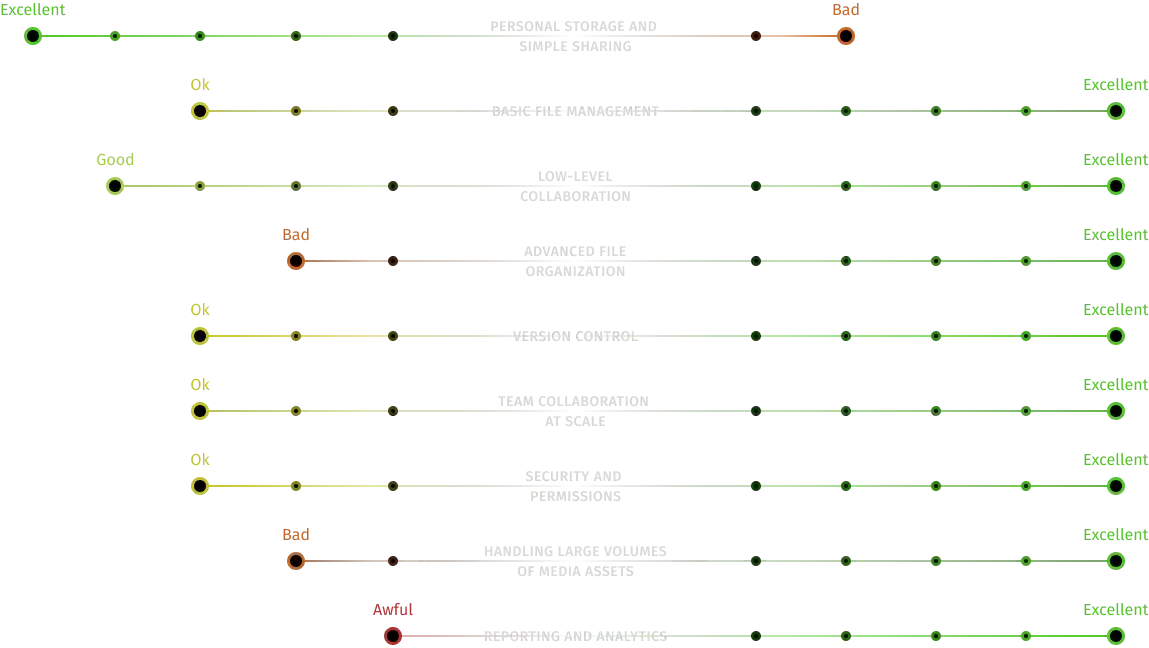
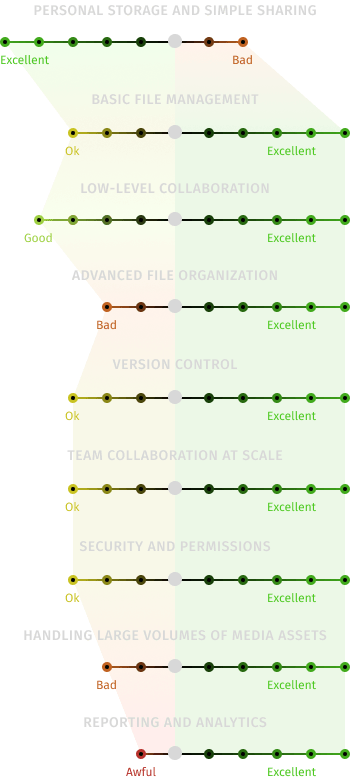
Why not just use Google Drive? Why isn’t Dropbox or Amazon S3 enough? These are valid questions. While these tools work well for personal storage or simple file sharing, they often seem to fall short when it comes to meeting the needs of a team — especially one that’s remote, spread across time zones, or handling multiple projects.
DAM software is built for teamwork. It brings order to chaos when cloud storage can no longer keep up. With features like better control, improved organization, faster search, versioning, and approvals, DAM offers capabilities that typical cloud storage platforms simply don’t.
DAM vs. Google Drive Comparison


What Problems Does DAM Solve?

Time-Consuming File Searches
Finding files can be a hassle, especially when they are scattered across different platforms and resources. This often leads to misplaced or lost assets. DAM addresses this issue by making file retrieval quick and easy. Using metadata, tags, filters, and AI-powered search, Pics.io lets you find any asset in seconds, even in vast collections.

Duplicate Files Everywhere
Managing multiple copies of the same file can be chaotic. DAM eliminates this problem by providing a single source of truth. It tracks all file versions, helping you quickly identify the most recent version and avoid outdated duplicates.

Slow Content Production
Efficient content production often gets bogged down by lengthy feedback loops and communication gaps. DAM simplifies collaboration by keeping all feedback in one place. With Pics.io, you can leave comments directly on files, assign tasks, and maintain transparent communication through integrated workflows — no more endless email threads.

Gaps in Data Security
Keeping digital assets secure requires careful access management. DAM addresses this by giving you precise control over who can view, edit, or share files. Role-based access settings help maintain security while keeping your asset management organized.

Team Changes as a Bottleneck
When a key team member like a content manager, designer, or editor leaves, it can disrupt workflows if they were responsible for managing important files. There’s a risk of losing valuable assets due to decentralized file management. DAM mitigates this risk by serving as a central repository for all work files, maintaining consistent organization and access.
How DAM Benefits Your Business
To understand what a DAM system is and how it can improve your team’s workflow, let's explore its key benefits:

Time savings
Teams can cut down the time spent searching for files by 50–60%. With Pics.io, you can easily find assets using keywords, file types, tags, or even specific content within an image.
Complete control of your content
Keep all your files in one organized system. Pics.io offers a central library with collections, metadata, filters, and custom fields, helping you keep your assets well-structured and easy to access.
Data security
Safeguard your assets from unauthorized edits or access. Pics.io comes with built-in permissions, watermarking, and encryption, offering solid protection for your content.

Smooth collaboration
Work together seamlessly, even from different locations. Pics.io supports real-time feedback, shared collections, and integrates with tools like Slack and Google Workspace, making collaboration simple and effective, no matter where your team is.

Better ROI
Speed up your campaigns and make the most of your existing content. Pics.io helps you reuse assets efficiently, cutting down on unnecessary work and reducing time to market.
How DAM Drives Team Efficiency
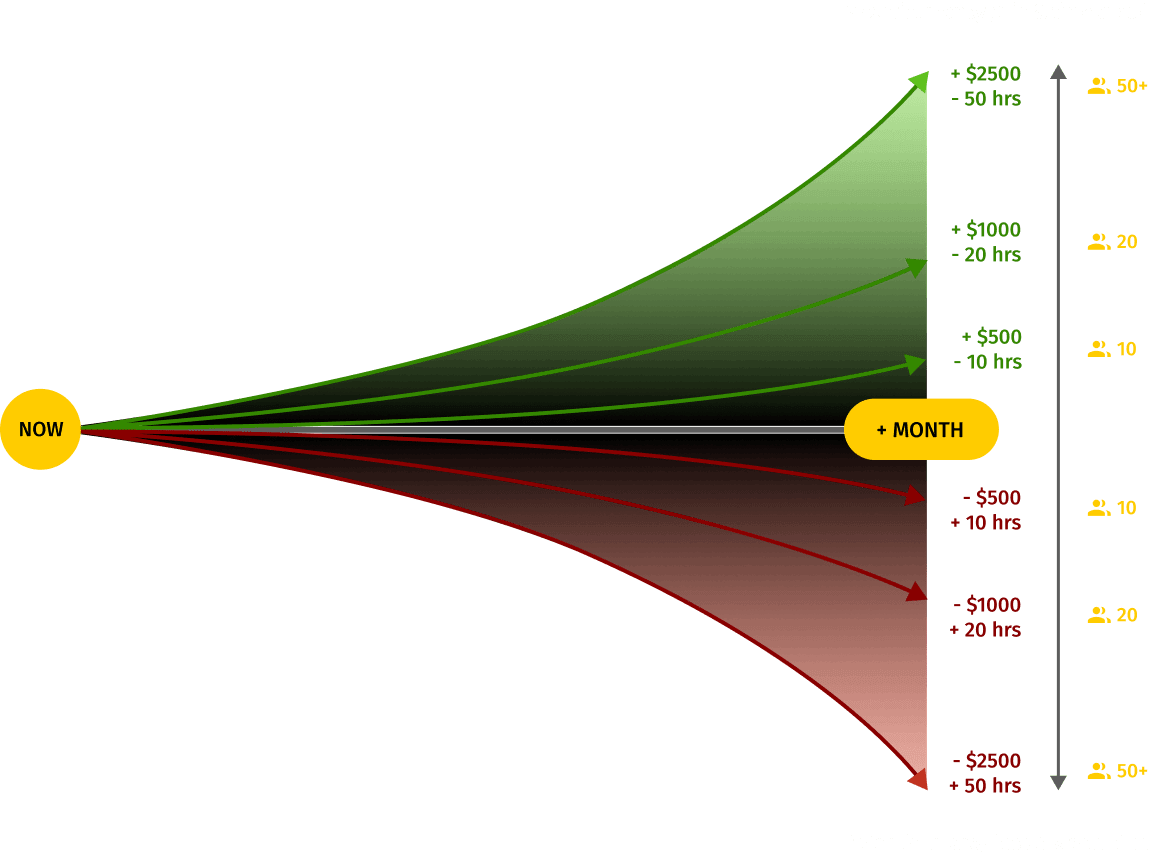
 10
1 designer, 2-3 marketing/comms specialists, external parties
10
1 designer, 2-3 marketing/comms specialists, external parties (to share assets with and receive assets from)
20
2-3 designers, up to 10 marketing/comms specialists, external parties (to share assets with and receive assets from)
50+
Mixed teams benefiting from Pics.io
Choosing the Right DAM: Checklist for Your Business
Now that you understand what digital asset management software is, let’s briefly explore how to select the best solution for your team:
Consider your team size and access needs:
The number of users who need access can affect the overall cost of your DAM solution.
Review the types of files you work with:
Ensure the DAM system supports the file formats you commonly use. While most systems support basic formats like JPG and DOC, not all are capable of handling a wide variety of video files.
Evaluate integration with existing tools and storage:
Consider the tools your team uses (e.g., Slack, Adobe, Shopify) and whether the DAM can integrate with them. Decide if you need cloud storage, a self-hosted solution, or an on-premise option. Pics.io integrates seamlessly with Google Drive and Amazon S3, but we also offer our own storage.
Assess compatibility with your workflow:
Make sure the DAM system aligns with your team’s processes. If necessary, we offer custom training to help your team get up to speed.
Ensure it offers the features you need:
Look for essential features such as easy file import and migration, integrations with cloud services (e.g., Google Drive, S3, Dropbox), AI tools for tagging and image recognition, user roles, permission controls, version control, and approval tools. Responsive customer support is also important. Be sure the system provides all the features your team requires.
Prioritize safety and security standards
Choose a DAM system that provides robust security features, including role-based access controls, data encryption, and compliance with industry standards.
Opt for regular support and updates
Select a DAM system that is consistently maintained and updated to keep up with technological advancements and security improvements. Reliable vendor support is crucial for ongoing stability.
Evaluate the total cost of ownership
Consider not just the initial setup cost but also expenses related to storage, data migration, and onboarding. Understanding the full financial impact will help you make an informed decision.
Digital Asset Management:
A Business Guide, Step by Step
If you're looking to gain a deeper understanding of Digital Asset Management (DAM) and explore best practices, our comprehensive guide is here to help. Developed by the expert behind Pics.io DAM, this resource is filled with practical insights and real-world use cases. It's designed to assist CEOs, team leaders, creative professionals, and anyone responsible for managing digital assets in maximizing the value of DAM.
Top Industries That Rely on DAM
Digital asset management software is useful for any industry that involves multiple creators and a large volume of assets. While its value is universal, certain industries rely on DAM systems more heavily due to specific needs in team collaboration and data sharing.
Marketing & Advertising



E-commerce

Media & Publishing

Education & Online Learning

Manufacturing & Corporate Teams
How a DAM System Works in Action

“Before Pics.io, our team spent up to 13% of their day just finding and uploading designs—on average, 9%. Since implementing Pics.io, the marketing team specifically has seen a 73% reduction in time spent searching for and retrieving assets compared to pre-launch.”

Pics.io approximately saves us half an hour per image. I like the interface in Pics.io DAM. I think it's easy to navigate. I really like this product. There was nothing in place before I got here. Adopting Pics.io digital asset management has been a big step in the right direction for us. So thank you!


"Pics.io helps centralize our storage, making our photos and other assets easy to archive and retrieve. The integration with Google Drive ensures everything is backed up and safe. We also appreciate the tagging and custom fields, which make it easier to organize and search for assets."

"Pics.io helped us clean up that process. It’s now much easier to organize, share, and access content without wasting time digging through duplicates or endlessly searching for the right file."

"The biggest benefit is the ability to store, categorize, and quickly find what we need. With Pics.io’s tagging and search functions, we can access assets instantly and share them easily with external partners."

“Pics.io helps us keep everything organized, so our social media manager can easily find specific images or features to highlight. Our content writers also use it for emails, blogs, and website content. It’s a valuable tool for both sales and marketing."

I absolutely love how adding comments to photos or videos or adding comments to videos is time-stamped. And then you can also set time codes in a comment too. That's been hugely helpful for me as a video editor.


We were searching for a service that would help us organize, manage and utilize our photos & media assets. We were spending a lot of time, sometimes hours, looking for the necessary file! Luckily, with Pics.io searchable and shareable asset organization, we are better organized and no longer have this issue.


I find Pics.io the easiest to use, the most intuitive, and the most robust

The main thing that drove us to you was that we could use our storage system based on our Google Drive system. All the other providers were charging lots of extra money for storage.

So the biggest challenge that was solved was getting every contributor working in the same location, all the files living together

I can't believe how well Pics.io DAM works. It's really amazing! Our staff put files in a shared Google Drive just for this purpose and then it shows up in Pics.io

We needed a metadata-based solution where we could just flag assets or write the description and then use the search tools to be able to discover those files more easily

Pics.io DAM is not only a time saver but convenience, and just allows us to be more productive

Pics.io has been really easy to work with!

Pics.io has dramatically sped-up the process of storing, sorting, and searching our photos. The positive impact it has had on our productivity has been immeasurable. And it uses our existing Google Drive storage, so no need to manage yet another cloud storage platform.

Last year we realized that we needed a Digital Asset Manager (DAM). None of us were saving images in the same location and there was no way to search for them. That's when we found Pics.io! One year later all our images are tagged, searchable, and even have face recognition! Pics.io has saved us a lot of time and money.

It is very intuitive and brings a lot of necessary features for today's workflow. For me, the foundation with Google Drive integration was tipping the scale and I made the decision to get more into it. For somebody getting in touch for the first time with classical dam-services, it is a perfect starter with more than fair pricing and a 24/7 scaling option for all features.

It’s so easy to find and reuse images with Pics.io! Everything is kept in one place and we can tag and sort our files cross-team, and then share them with our PR team. Without Pics.io it would be impossible to keep on-top of our social media marketing.

What we really like about Pics.io is that it allows you to build everything off your cloud storage. It’s really great as we’re already paying for your cloud storage to store all our files in the cloud, so it seems kind of silly to pay twice, right? With Pics.io you get the same unlimited storage for the same effective price!

Great system! We've been using Pics.io to store and modify our pictures here at work for some months now. The assistance is really good, fast and efficient.

My clients and I love working with this platform. Good handling. Easy to use.

Platform is easy to use and great for managing images.

We've already started a trial to learn more about the Pics.io tool, but it feels like we've known it for years. I'm super excited to show this tool to our clients.

This program is so easy to use and very intuitive and the customer service is top-notch when something isn't clear. This program has already saved my team a lot of time.

Design plays an important role in the work we do at Recruitee and Pics.io helps us efficiently centralize, manage and share our many visual assets.
Bring Order to Your Files With Pics.io
Frequently (Un)Asked Questions (FAQ)
What does "digital assets" mean?
Digital assets are any files you create, use, or share in digital form. Photos, videos, logos, PDFs, presentations, design files, spreadsheets, audio clips—you name it. If it lives on your computer, sits in cloud storage, or gets passed around your team, it counts. So whether it’s a product photo for your website or a video ad for social media, it’s a digital asset.
Is DAM only for big companies?
Not at all. DAM is just as valuable for small teams, freelancers, nonprofits, and growing businesses. You don’t need a massive content library or a big budget to make the most of it. If you manage a large number of files or collaborate with external contributors, DAM can make your work much easier.
How long does it take to get started?
Integrating DAM typically takes anywhere from one day to two or three weeks, depending on the size of your company and the volume of your content library. No IT team is needed. However, if you need assistance with setup or file migration, our support team—including developers—is ready to help.
Can DAM connect with the tools we already use?
Yes, most established DAM systems, like Pics.io, integrate with tools like Google Drive, Amazon S3, Shopify, Adobe Creative Cloud, Slack, and more. This means you don’t have to change your entire workflow—just connect DAM to it.
What do we need to get started with DAM?
Getting started with DAM doesn’t take much—just a bit of structure. The more organized your files are from the beginning, the quicker you’ll see the benefits. It also helps to have someone on your team act as a DAM manager (like your own file librarian).
Is DAM secure enough for sensitive content?
Security varies from one DAM system to another. It’s important to remember that security doesn’t just depend on the DAM itself but also on the storage providers it integrates with. At Pics.io, we prioritize file safety by using encrypted storage, role-based access, and secure sharing links. You have full control over who can view, edit, or download your assets.
Note: If you’re using AI features like auto-tagging or image recognition, some data may be processed on external servers, depending on the provider and your consent.
How much does DAM cost?
The average cost of a DAM system can go over $50,000 per year—but don’t worry, that’s for high-end, enterprise-level solutions. There are plenty of effective DAM systems available starting at around $150 per month.
Pics.io offers flexible plans starting at $50/month. You can find the full breakdown on our pricing page.
Can I use DAM if I already store files in Google Drive or Amazon S3?
It depends on the DAM system you choose. Typically, you’ll need to migrate all your files to your new DAM vendor’s storage. However, with Pics.io, there’s no need to move anything. It works on top of your existing storage—just connect your drive and start organizing.
Do I need training to use DAM?
Not at all. If you’ve used Google Drive or Dropbox before, you’ll find DAM just as intuitive. Plus, most DAM providers offer plenty of support, including help articles, video tutorials, and real people to guide you.
Tip: Pics.io packages starting from the Micro plan include a free training session to help you get started.
What kind of files can I manage with DAM?
A DAM system can handle just about anything—images, videos, audio files, PDFs, design files (like PSD, AI, INDD), 3D models, and more. For the full list of formats Pics.io supports, check out the link.